说明
- ThinkEditorKit内置有fileBar、editBar、insertBar、printBar、viewBar 五个tab页签
- 支持页签显示重命名和页签内部组件自定义
- 默认分组 按顺序 内置有group1/group2/group3/group4 分组。单个group可独立独立自定义
- 用户可覆盖默认分组 或 追加自定义分组
页签配置总结
以editBar示例说明
隐藏页签行为
| 参数 | 是否隐藏页签 | 说明 |
|---|---|---|
| editBar: null/undefined | 否 | 使用内置/当前页签配置 |
| editBar: {} | 是 | 该页签为空,需要隐藏 |
| editBar: { items: null/undefined } | 否 | 等同于editBar: null/undefined |
| editBar: { items: {} } | 是 | 等同于editBar: {} |
隐藏group行为
| 参数 | 是否隐藏group | 说明 |
|---|---|---|
| editBar: { items: { group1: null/undefined } } | 否 | 使用内置/当前页签配置 |
| editBar: { items: { group1: [] } } | 是 | 该group为空,需要隐藏;其他未指明group不受影响 |
自定义tab名
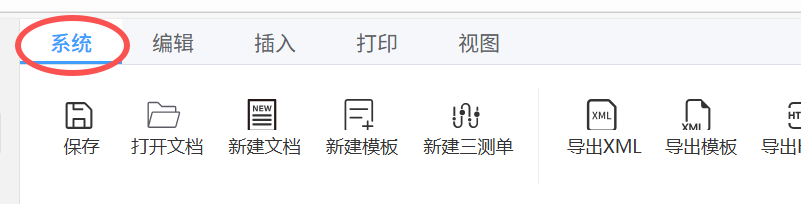
`示例:将”文件”页签名 重命名为”系统”
fileBar: {
  name:"系统"
}
修改组件样式
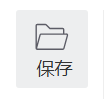
上图标+下文字
- 关键配置
type: "btnIcon", appendName: "bottom",- 示例代码
fileBar: { name:"系统", items:{ group1: [ [ { name: "保存", key: "openDoc", type: "btnIcon", appendName: "bottom", } ], ] ] } }- 效果图
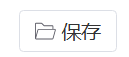
图标+文本按钮
- 关键配置
type: "btnText"`- 示例代码
fileBar: { name:"系统", items:{ group1: [ [ { name: "保存", key: "openDoc", type: "btnText" } ], ] ] } }- 效果图
文本按钮
- 关键配置key没有通过iconMap配置对应到图标资源时,则没有按钮图标
key: "customKey", type: "btnText"`- 示例代码
fileBar: { name:"系统", items:{ group1: [ [ { name: "保存", key: "customKey", type: "btnText" } ], ] ] } }- 效果图

隐藏页签
配置为{}时 不显示对应页签
- fileBar使用内置默认配置
- 隐藏了insertBar、printBar、viewBar。
- editBar重写了group1
var thinkEditorKit = new ThinkEditorKit({
  fileBar: null,
  insertBar:{},
  printBar: {},
  viewBar: {},
  editBar: {
      items: {
        group1: [
          [
            {
              name: "剪切",
              key: "cut",
              type: "btnIcon",
              appendName: "bottom",
            },
          ],
        ]
      },
    }
})
显示效果
动态显示隐藏页签
不隐藏
 thinkEditorKit.Configure({ hideToolBarItems: [] });
部分隐藏
 thinkEditorKit.Configure({ hideToolBarItems: ["fileBar", "viewBar"] });
显示效果
自定义某个内置group
editBar: {
    items: {
      group1: [
        [
          {
            name: "剪切",
            key: "cut",
            type: "btnIcon",
            appendName: "bottom",
          },
        ],
      ],
    },
  }
显示效果
某个内置group不显示
配置为[]时 不显示对应group
- group1,不受影响
- group2无可显示内容,自动隐藏
- 其他group未配置,不受影响
editBar: {
    items: {
      group1: null,
      group2: [],
    },
  }
追加1个自定义分组
userAdd名称可自定义
editBar: {
    items: {
      userAdd: [
        [
          {
            name: "剪切",
            key: "cut",
            type: "btnIcon",
            appendName: "bottom",
          },
        ],
      ],
    },
  }
显示效果
文档更新时间: 2026-05-13 15:20 作者:admin