问题描述
Q: 如何配置元素的源
解决方案
方式一:通过内置UI 插入/更新时 配置
弹出内置UI-手动输入源
thinkEditor.DisplayElementSetWindow(E_DISPLAY_MODE.Show, E_SET_MODE.InsertCommon, {})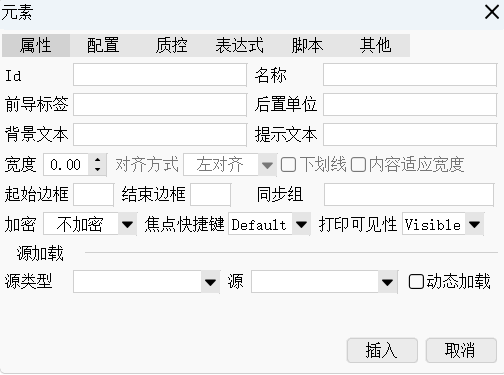
如需UI默认值,详见SetElementConfig可配置项。示例:弹出UI 初始化元素源
thinkEditor.DisplayElementSetWindow(E_DISPLAY_MODE.Show, E_SET_MODE.InsertCommon, {
    source:{
        sourceClass:"基础数据",
        sourceId:"性别"
    }
});
方式二:通过接口插入元素时配置
thinkEditor.InsertElement({
    source:{
        sourceClass:"基础数据",
        sourceId:"性别"
    }
});
方式三:通过接口配置文档中已有元素的源
- 需通过identity标识定位元素,比如Id
thinkEditor.SetElementConfig({
    id:"id1"
}
,{
    source:{
        sourceClass:"基础数据",
        sourceId:"性别"
    }
});
文档更新时间: 2026-05-26 09:46 作者:admin